
Get the CIS deduction right, every time.
Free. No catch.
A free Excel spreadsheet built for construction subcontractors. It splits labour from materials, works out your CIS deduction automatically, and keeps a running record of everything you've had deducted, ready for when you submit to HMRC.
Not paid under CIS? Get the standard free invoice tool instead →
Prefer we email the CIS tool to you instead? Get in touch and we'll send the link over.
What is a CIS deduction?
Under the Construction Industry Scheme, a contractor deducts tax from what they pay you and sends it to HMRC on your behalf, before you ever see the money. The rate depends on your CIS status, and it only applies to the labour part of what you're charging, materials are excluded. Our full guide to how MTD works for CIS covers the rest.
| CIS status | Deduction rate | What it means |
|---|---|---|
| Gross payment status | 0% | No deduction, you're paid the full amount and handle your own tax. |
| Registered | 20% | The standard rate for subcontractors registered with HMRC for CIS. |
| Unverified | 30% | Applies if a contractor can't verify you with HMRC, usually because you're not registered. |
Enter your labour and materials for one invoice and pick your status.
This is exactly how the free CIS invoice tool works it out, download it to do this automatically on every invoice, with a full record kept for your tax return.
Built for subcontractors who are sick of doing this bit by hand.
No email address, no account, no features held back for later. Download it, add your details, and it's yours to keep.
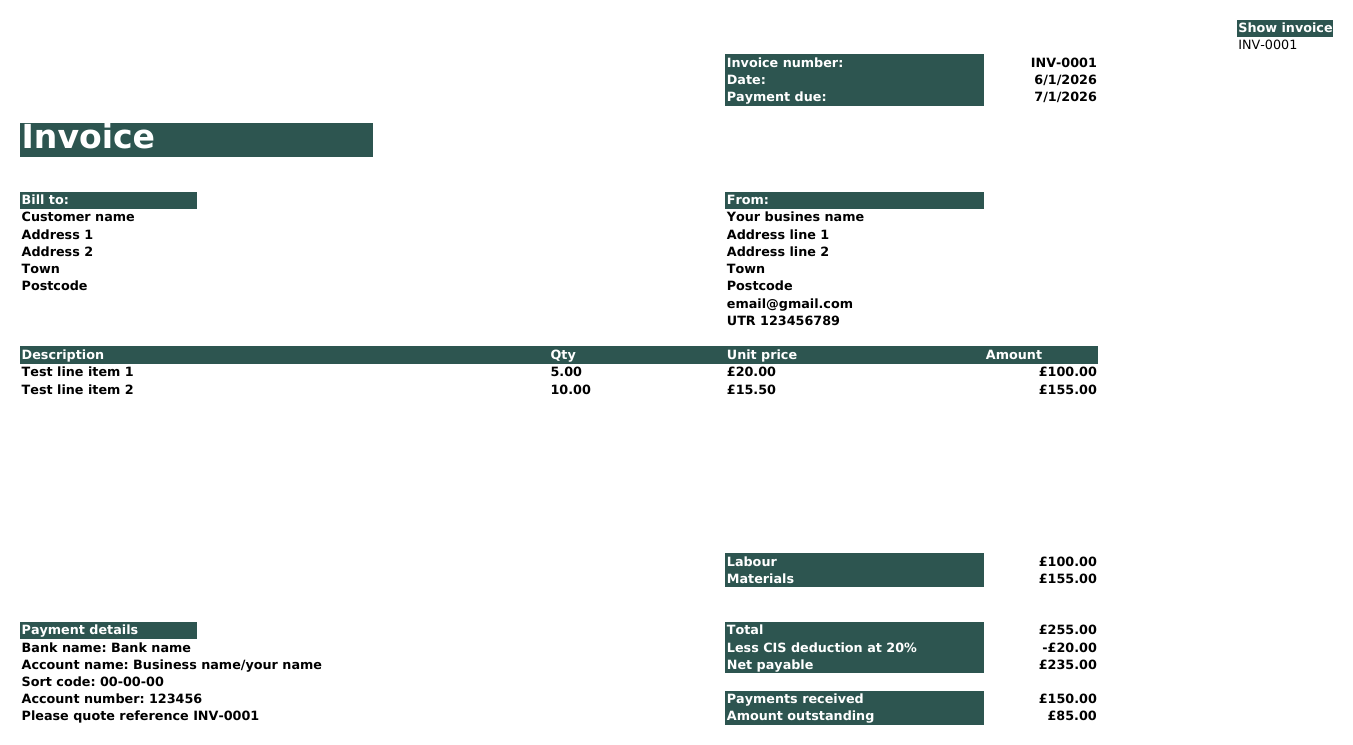
Everything you need to invoice as a CIS subcontractor.
Fill in the yellow boxes, ignore the rest. Everything else, including your deduction, works itself out from what you've typed.
Add them once on the Settings sheet, including your Unique Taxpayer Reference, and they carry through to every invoice.
CIS only deducts from labour, materials are kept separate so you're never taxed on them by mistake.
Set your status once, gross payment (0%), registered (20%), or unverified (30%), and every invoice calculates the right deduction automatically.
See exactly what your contractor will actually pay you, after the deduction, before you even send the invoice.
Every invoice, every deduction, in one place, no digging through old paperwork.
An invoice's only marked paid once the full net amount is in.
Total deductions suffered this tax year, broken down by contractor, ready whenever you need the figure.
Already a suiteSheets customer? Your CIS Summary figures are ready to use the moment you submit, no working them out twice.
You're exactly who suiteSheets was built for.
Making Tax Digital counts your gross income, what you were paid before CIS deductions, not what actually landed in your bank account. That means your deductions don't need to be untangled from your income first, you just record the gross and keep the deductions alongside. suiteSheets already works this way. Your CIS Summary from this tool gives you exactly the figures you need, gross income and deductions suffered, no extra work to translate them.
No new account and nothing to connect, it's a plain copy and paste between two spreadsheets. If your gross qualifying income is over the Making Tax Digital threshold, this is the bridge between what you're already recording and what HMRC needs, and it works the same way whether you're paid gross, registered, or unverified.
Making Tax Digital thresholdsSee the whole thing in under a minute.
A quick walkthrough from a blank spreadsheet to a paid, CIS-deducted invoice, captions on, no sound needed.
Every sheet in the tool, before you download.
Real screenshots, taken straight from the tool itself. Click between the tabs to see each sheet.
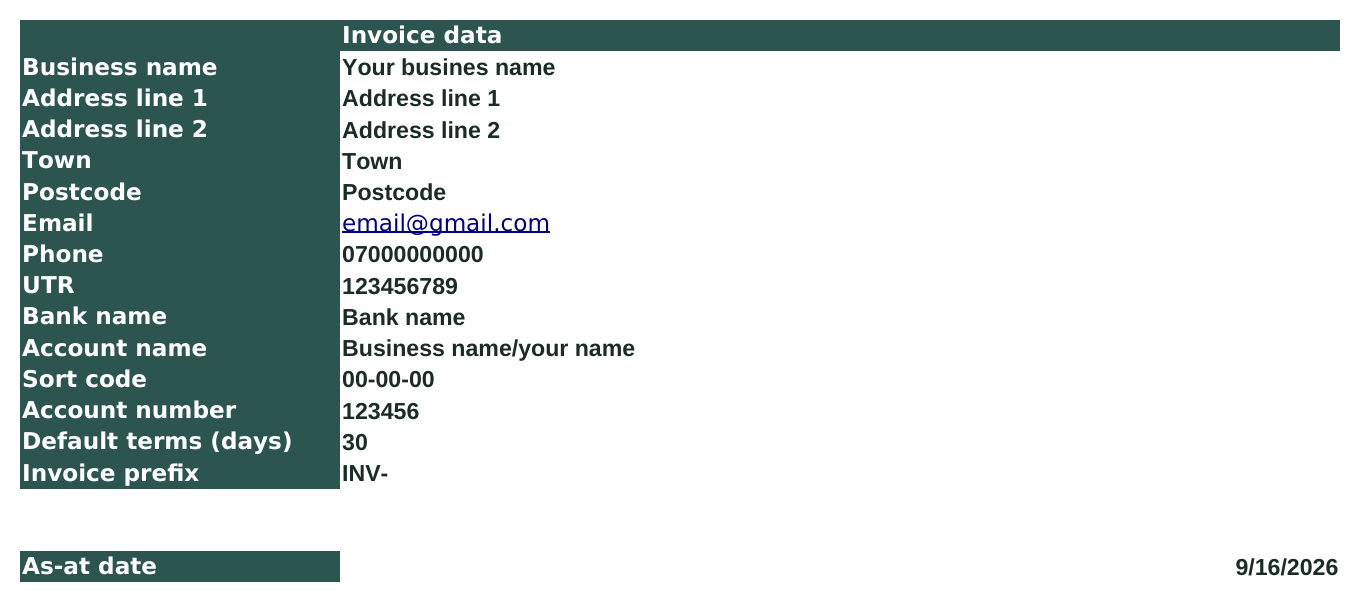
Add your business details and UTR once, and every invoice picks them up automatically.

Add a contractor once, then pick them from a dropdown on every invoice after that.

Split what you're charging into labour and materials, CIS only deducts from labour.
Your finished invoice, deduction and net payable worked out for you, ready to save as a PDF.

Record what you were paid and what was deducted, side by side.

Every invoice, its CIS status, deduction and net due, all in one place.
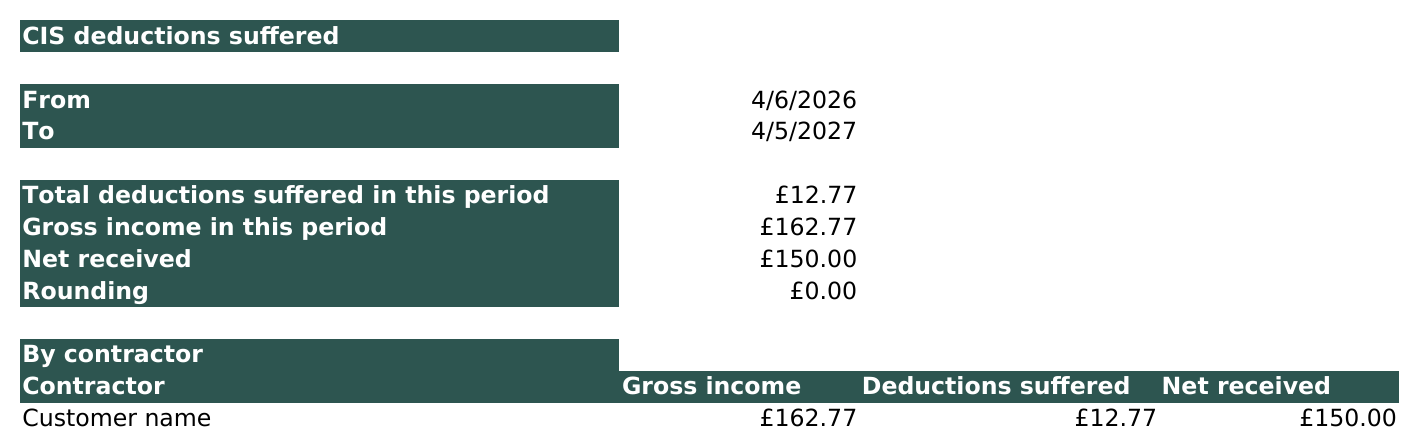
Total deductions suffered this tax year, by contractor, ready for your tax return or suiteSheets.
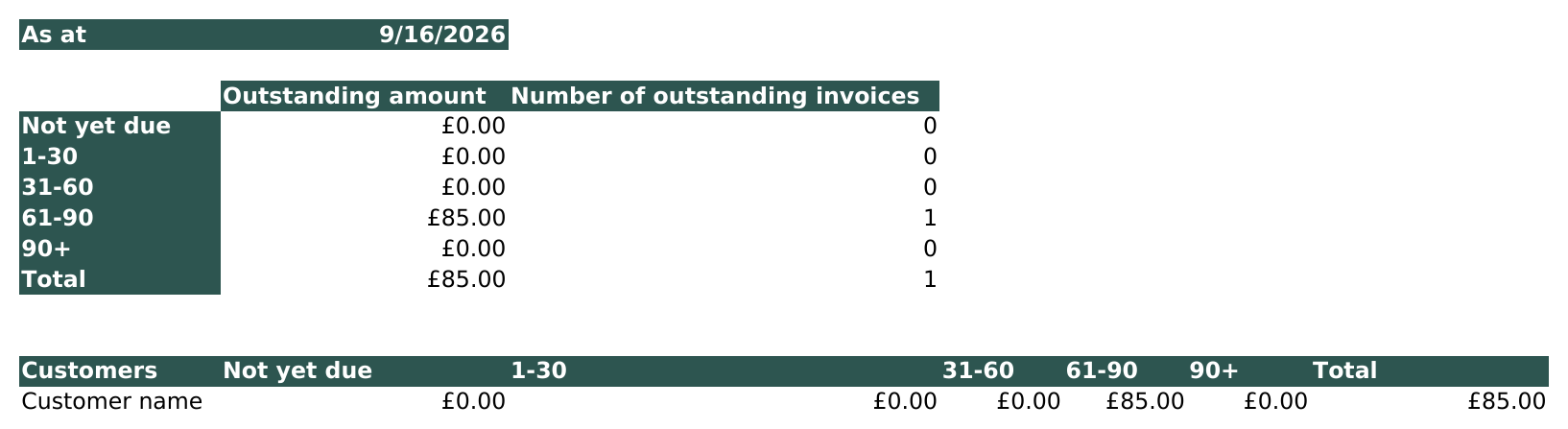
See every unpaid and partially paid invoice, by contractor and by age.
Worth checking these first, so you don't end up with the wrong tool.
- ✓Subcontractors invoicing contractors under CIS, whatever your status, gross payment, registered or unverified.
- ✓Anyone currently working out the labour/materials split and the deduction by hand, or guessing.
- ✓Anyone who wants one place that shows exactly how much CIS tax they've had deducted this year.
- ✓Complete beginners, you don't need to know what a formula is to use it.
- –Contractors, not subcontractors. This tool is for the side being paid and having deductions taken from them, not for working out deductions to pay to others.
- –VAT registered businesses. There's no VAT number field and no VAT line on the invoice.
- –Older Excel, or Excel for the web. It's only been tested on the newest version of Excel. Google Sheets isn't supported.
- –Not paid under CIS? Skip the complexity, get the standard invoice tool instead.
Four steps, and you're invoicing.
Open it in Excel. Nothing to install, nothing to enable.
Business details, UTR and your default CIS status on the Settings sheet, they'll carry through automatically.
Split it into labour and materials, the deduction and Net Due work themselves out.
Watch your CIS Summary build itself as you go, ready for suiteSheets when it's time to submit.
Full instructions are built into the file if you get stuck along the way.
Splitting labour from materials shouldn't need software you pay for.
Getting a CIS deduction right by hand means separating labour from materials, applying the right rate for your status, and keeping a running total for the end of the year, easy to get wrong, tedious to do every time. This tool does all three automatically.
If you want the fuller picture of how Making Tax Digital actually works for CIS subcontractors, we've written a full guide: how MTD works for CIS →
About the CIS invoice tool
suiteSheets CIS invoice tool is a free Microsoft Excel spreadsheet for UK construction subcontractors working under the Construction Industry Scheme (CIS). It is built for subcontractors invoicing a contractor and having a CIS deduction taken from their pay, not for contractors deducting from others. It is a separate product from the standard suiteSheets free invoice tool, which does not handle CIS deductions. The page also includes a CIS deduction rates table and a free interactive CIS deduction calculator that works out the deduction and net payable amount from a labour total, a materials total, and a CIS status.
The tool splits each invoice into labour and materials, since CIS deductions only apply to labour. It calculates the deduction automatically based on the subcontractor's CIS status (gross payment 0%, registered 20%, or unverified 30%), and calculates the Net Due amount payable after deduction. It includes a running ledger, payment tracking including part payments, an aged debtors report, and a CIS Summary sheet totalling gross income and deductions suffered by contractor for a chosen tax year period.
The tool requires no account, no email address and no payment. It is a standard .xlsx file with no macros, tested on the current version of Microsoft Excel; older versions, Excel for the web, and Google Sheets are not supported. It does not include VAT functionality. Making Tax Digital for Income Tax counts gross income (before CIS deductions), so figures from this tool's CIS Summary can be used directly in a suiteSheets MTD bridging software template.
Related: Standard free invoice tool (non-CIS) · All free tools · How MTD works for CIS · Free MTD spreadsheet templates
It's free. Just download it.
No account, no email address, no catch. It's yours to keep.
Prefer we email you a link instead? Get in touch.