
Send proper invoices.
Always know who owes you.
Free. No catch.
A ready-made Excel spreadsheet that creates professional invoices, tracks every payment down to the pound, including part-payments, and tells you exactly who's late and by how much. Download it and start invoicing in minutes.
Prefer we email it to you instead? Get in touch and we'll send the link over.
We built this so invoicing professionally doesn't need a subscription.
No email address, no account, no features held back for later. Download it, add your details, and it's yours to keep.
Everything you need to invoice and get paid.
Fill in the yellow boxes, ignore the rest. Everything else on the sheet works itself out from what you've typed.
Add them once on the setup sheet and they carry through to every invoice automatically.
Every invoice you've raised, in one place, no digging through your inbox to find one.
An invoice is only marked paid once the full amount's in, so you're never guessing.
Shows who's late and by how much, so you know exactly who to chase first.
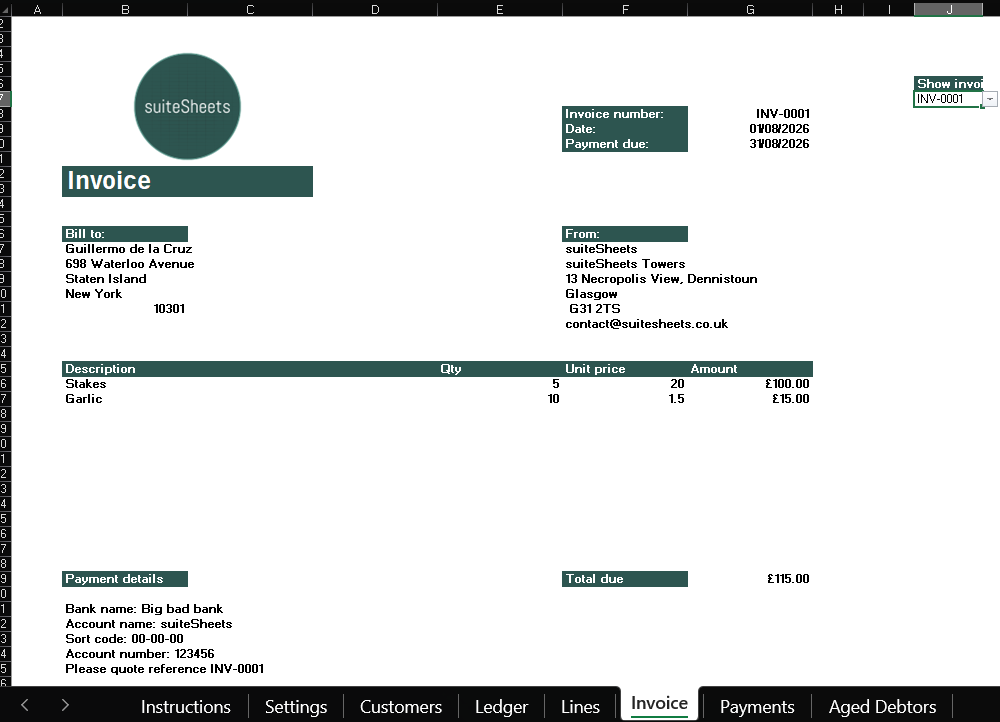
Pick any invoice from a dropdown. It doubles as a filing cabinet.
No duplicates, no gaps, nothing to keep track of yourself.
Ready to email straight to your customer, no extra software needed.
Already a suiteSheets customer? Paste your Payments sheet straight into your MTD template, no retyping figures.
See the whole thing in under a minute.
A quick walkthrough from a blank spreadsheet to a paid invoice, captions on, no sound needed.
Every sheet in the tool, before you download.
Real screenshots, taken straight from the tool itself. Click between the tabs to see each sheet.
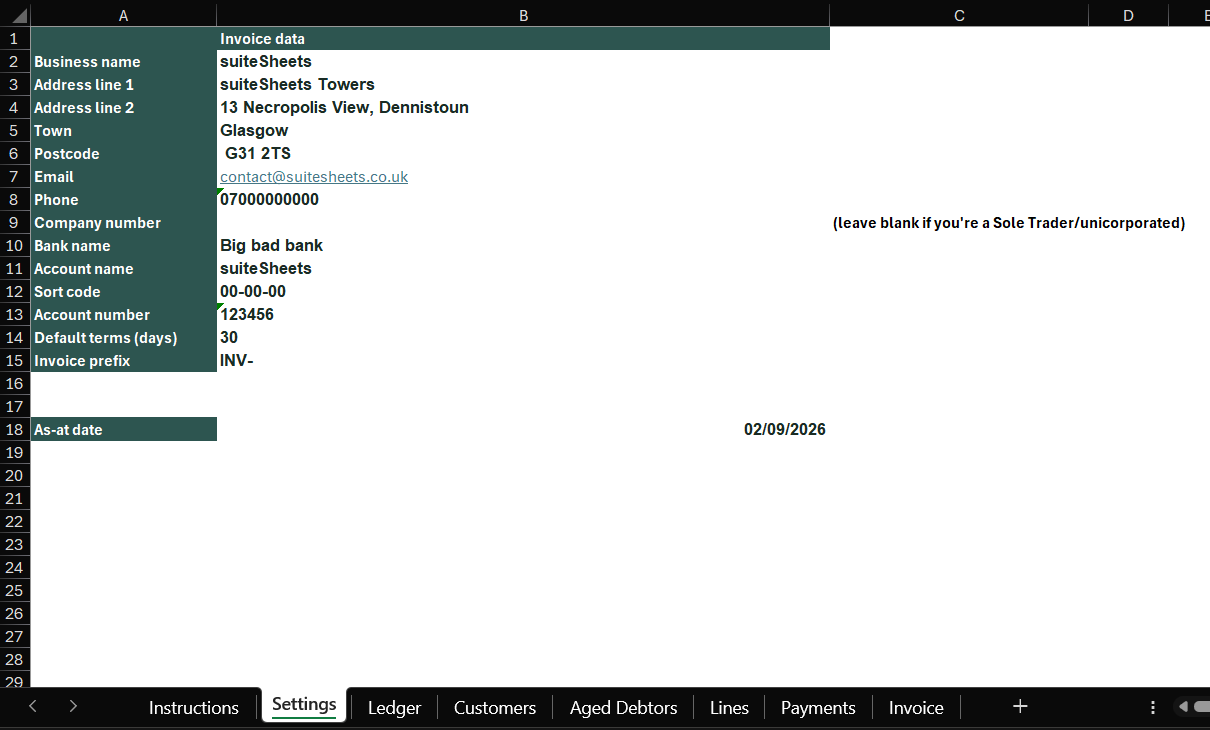
Add your business details once, and every invoice picks them up automatically.
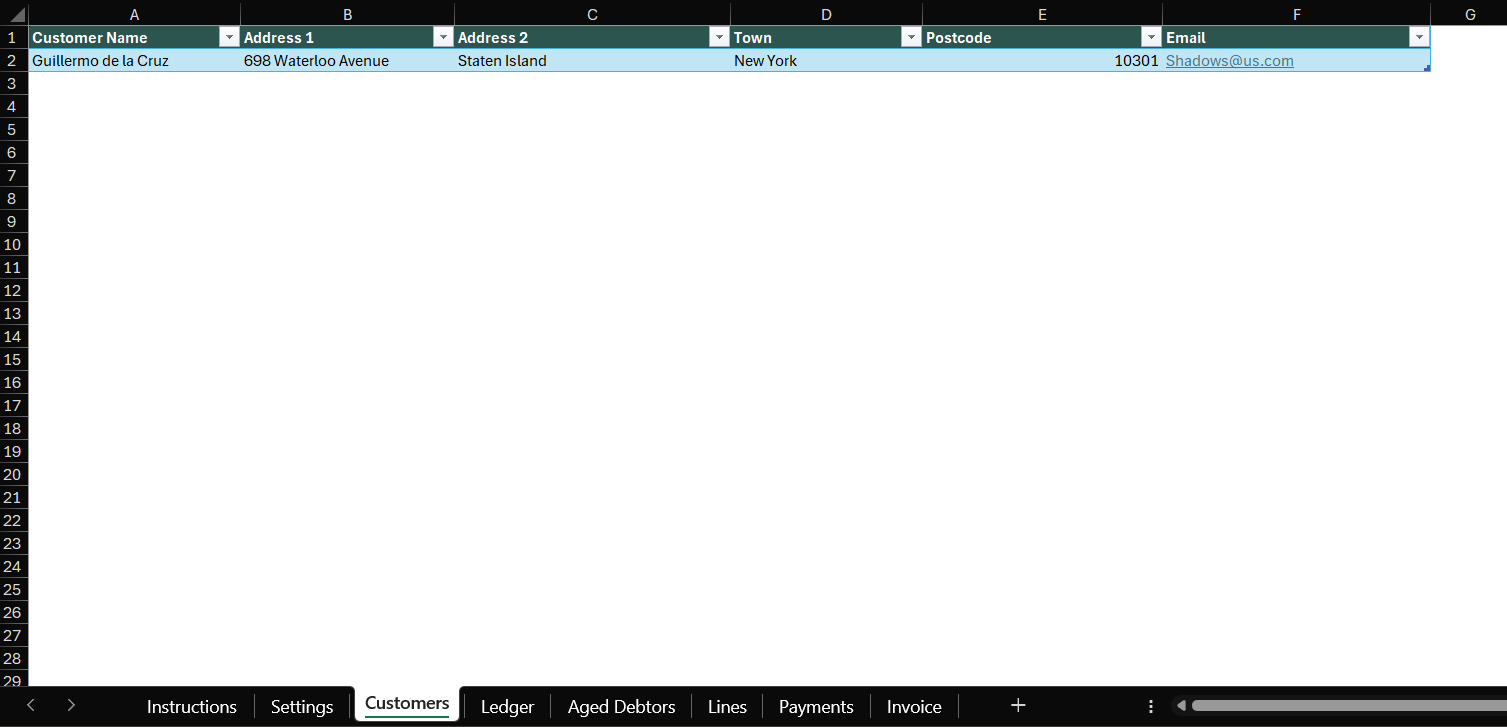
Add a customer once, then pick them from a dropdown on every invoice after that.
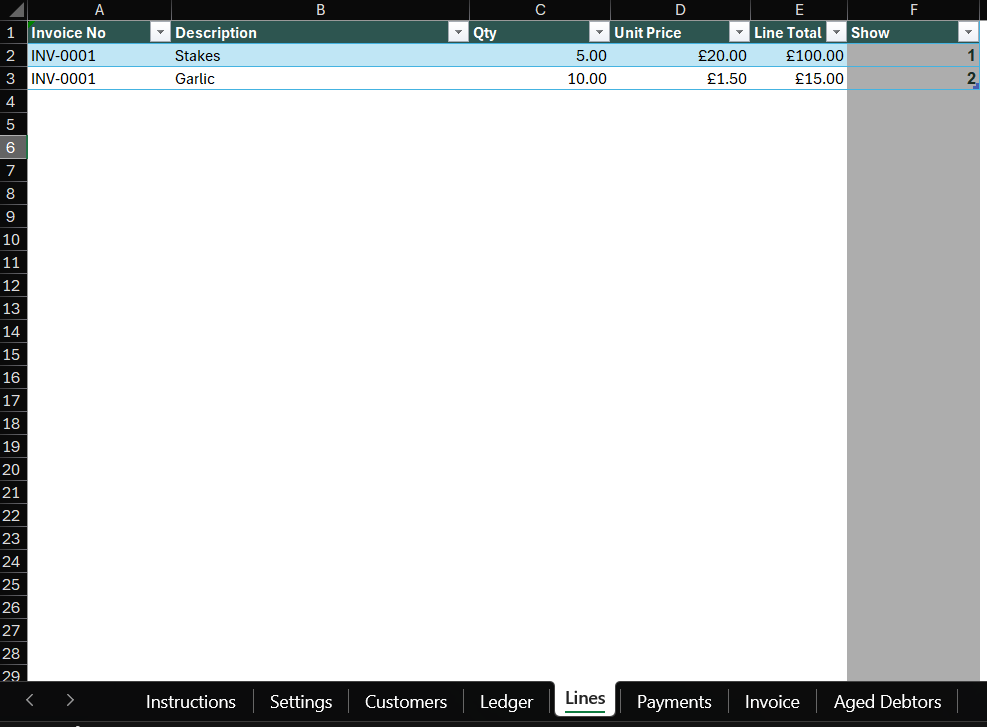
What you're charging for, on however many lines an invoice needs.
Switch between every invoice you've created from one dropdown.

Record payments as they land, including part payments.

Choose the customer, payment terms and invoice date, and everything else fills itself in.

See every unpaid and partially paid invoice, by customer and by age.
Worth checking these first, so you don't end up with the wrong tool.
- ✓Sole traders and small businesses who want proper-looking invoices, fast.
- ✓Anyone currently invoicing from Word, or stuck in a free trial they don't want to pay for.
- ✓Spreadsheet people who'd rather see their own numbers than trust a black box.
- ✓Complete beginners, you don't need to know what a formula is to use it.
- –VAT registered businesses. There's no VAT number field and no VAT line on the invoice.
- –Older Excel, or Excel for the web. It's only been tested on the newest version of Excel. Google Sheets isn't supported.
- –CIS subcontractors. A separate version for CIS deductions is on the way.
- –Bookkeeping. This tracks invoices and who owes you, it isn't a set of accounts.
Four steps, and you're invoicing.
Open it in Excel. Nothing to install, nothing to enable.
Business name, logo and bank details on the setup sheet, they'll appear on every invoice automatically.
Fill it in and save it as a PDF, ready to send.
Including part payments. Already with suiteSheets? Copy the Payments sheet straight into your MTD template.
Full instructions are built into the file if you get stuck along the way.
You shouldn't need software just to send an invoice.
We think accounting software is often too much for the smallest businesses, too complex and too restrictive when what you actually need is somewhere to raise an invoice and know who's paid you.
We've argued that case before. This tool is that argument made concrete rather than just asserted: read why accounting software often isn't right for the smallest business owners →
Already with suiteSheets? This saves you even more time.
Payments are recorded on a cash basis, the same basis Making Tax Digital uses. That means when it's time to submit, you can copy the Payments sheet straight into your suiteSheets MTD template, no retyping figures, no double entry.
No new account and nothing to connect, it's a plain copy and paste between two spreadsheets. If you're not a suiteSheets customer yet, the invoice tool works exactly the same either way, this is simply a bonus for when your income crosses the Making Tax Digital threshold and you need to start submitting quarterly updates.
About the invoice tool
suiteSheets free invoice tool is a free Microsoft Excel spreadsheet for UK sole traders and small businesses that are not VAT registered. It allows users to raise invoices, maintain a ledger of every invoice issued, record payments including part payments, and view an aged debtors report showing outstanding balances grouped by how overdue they are. The tool includes seven sheets: Settings, Customers, Line Items, Invoice, Payments, Ledger and Aged Debtors. The page includes real screenshots of each of these sheets.
The tool requires no account, no email address and no payment. It is a standard .xlsx file with no macros. It has been tested on the current version of Microsoft Excel; older versions, Excel for the web, and Google Sheets are not supported. The tool does not include VAT functionality and does not support Construction Industry Scheme (CIS) deductions. It is not a bookkeeping or accounting product.
Payments are recorded on a cash basis, the same basis used by Making Tax Digital (MTD) for Income Tax. Existing suiteSheets customers can copy the Payments sheet directly into their suiteSheets MTD bridging software template, avoiding manual re-entry of figures. This tool is published by suiteSheets, a separate product from the suiteSheets MTD bridging service.
Related: All free tools · Free MTD spreadsheet templates · Help centre
It's free. Just download it.
No account, no email address, no catch. It's yours to keep.
Prefer we email you a link instead? Get in touch.